> ## Documentation Index
> Fetch the complete documentation index at: https://docs.base.org/llms.txt
> Use this file to discover all available pages before exploring further.
# Use Sub Accounts
> Learn how to create and use Sub Accounts using Base Account SDK
export const GithubRepoCard = ({title, githubUrl}) => {
return
;
};
## What are Sub Accounts?
Sub Accounts allow you to provision app-specific wallet accounts for your users that are embedded directly in your application. Once created, you can interact with them just as you would with any other wallet via the wallet provider or popular onchain libraries like wagmi and viem.
Looking for a full implementation? Jump to the [Complete Integration Example](/base-account/improve-ux/sub-accounts#complete-integration-example).
**Do you prefer video content?**
There is a video guide that covers the implementation in detail in the [last section of this page](#video-guide).
## Key Benefits
* **Frictionless transactions**: Eliminate repeated signing prompts for high frequency and agentic use cases or take full control of the transaction flow.
* **No funding flows required**: Spend Permissions allow Sub Accounts to spend directly from the universal Base Account's balance.
* **User control**: Users can manage all their sub accounts at [account.base.app](https://account.base.app).
If you would like to see a live demo of Sub Accounts in action, check out our [Sub Accounts Demo](https://sub-accounts-fc.vercel.app).
**Spend Permissions**
Sub Accounts are optimized for use with Spend Permissions to allow your app to take advantage of the user's existing Base Account balances. See the [Spend Permissions](/base-account/improve-ux/spend-permissions) guide for more information about how they work.
## Installation
Install the Base Account SDK:
```bash npm theme={null}
npm install @base-org/account
```
```bash pnpm theme={null}
pnpm add @base-org/account
```
```bash yarn theme={null}
yarn add @base-org/account
```
```bash bun theme={null}
bun add @base-org/account
```
## Quickstart
The fastest way to adopt Sub Accounts is to set `creation` to `on-connect` and `defaultAccount` to `sub` in the SDK configuration.
```tsx page.tsx theme={null}
const sdk = createBaseAccountSDK({
// ...
subAccounts: {
creation: 'on-connect',
defaultAccount: 'sub',
}
});
```
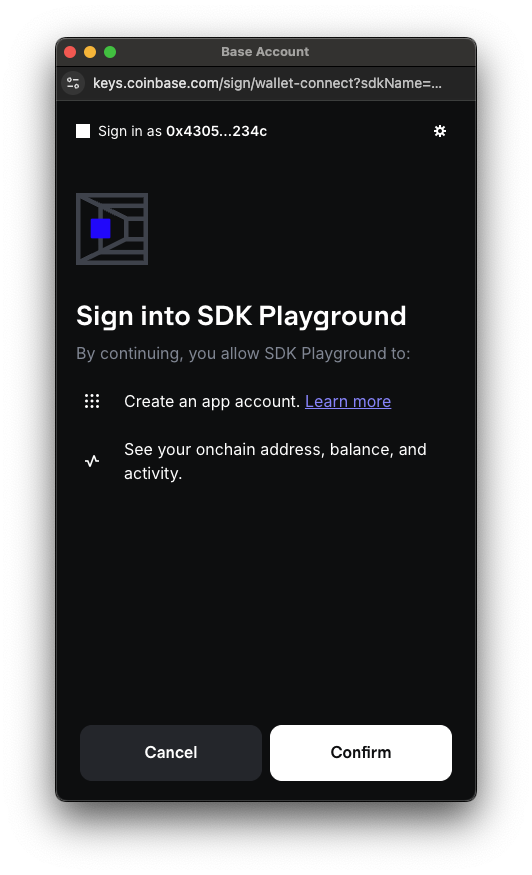
This will automatically create a Sub Account for the user when they connect their Base Account and transactions will automatically be sent from the Sub Account unless you specify the `from` parameter in your transaction request to be the universal account address. Spend Permissions will also be automatically requested for the Sub Account as your app needs them.
This is what the user will see when they connect their Base Account and automatic Sub Accounts are enabled:
We recommend using a [Paymaster](/base-account/improve-ux/sponsor-gas/paymasters) to sponsor gas to ensure the best user experience when integrating Sub Accounts. You can set a paymaster to be used for all transactions by configuring the `paymasterUrls` parameter in the SDK configuration. See the [createBaseAccount](/base-account/reference/core/createBaseAccount#param-paymaster-urls) reference for more information.
**Do you prefer video content?**
There is a video guide that covers this specific implementation in the [last section of this page](#video-guide).
## Using Sub Accounts
### Initialize the SDK
First, set up the Base Account SDK. Be sure to customize the `appName` and `appLogoUrl` to match your app as this will be displayed in the wallet connection popup and in the account.base.app dashboard. You can also customize the `appChainIds` to be the chains that your app supports.
```tsx page.tsx theme={null}
import { createBaseAccountSDK, getCryptoKeyAccount } from '@base-org/account';
import { base } from 'viem/chains';
// Initialize SDK with Sub Account configuration
const sdk = createBaseAccountSDK({
appName: 'Base Account SDK Demo',
appLogoUrl: 'https://base.org/logo.png',
appChainIds: [base.id],
});
// Get an EIP-1193 provider
const provider = sdk.getProvider()
```
### Create a Sub Account
Make sure to authenticate the user with their Base Account before creating a Sub Account.
For that, you can choose one of the following options:
* Follow the [Authenticate users](/base-account/guides/authenticate-users) guide
* Simply use `provider.request({ method: 'eth_requestAccounts' });` for a simple wallet connection
Create a Sub Account for your application using the provider's [wallet\_addSubAccount](/base-account/reference/core/provider-rpc-methods/wallet_addSubAccount) RPC method. When no `publicKey` parameter is provided, a non-extractable browser CryptoKey is generated and used to sign on behalf of the Sub Account.
```tsx page.tsx theme={null}
// Create sub account
const subAccount = await provider.request({
method: 'wallet_addSubAccount',
params: [
{
account: {
type: 'create',
},
}
],
});
console.log('Sub Account created:', subAccount.address);
```
Alternatively, you can use the SDK convenience method:
```tsx page.tsx theme={null}
const subAccount = await sdk.subAccount.create();
console.log('Sub Account created:', subAccount.address);
```
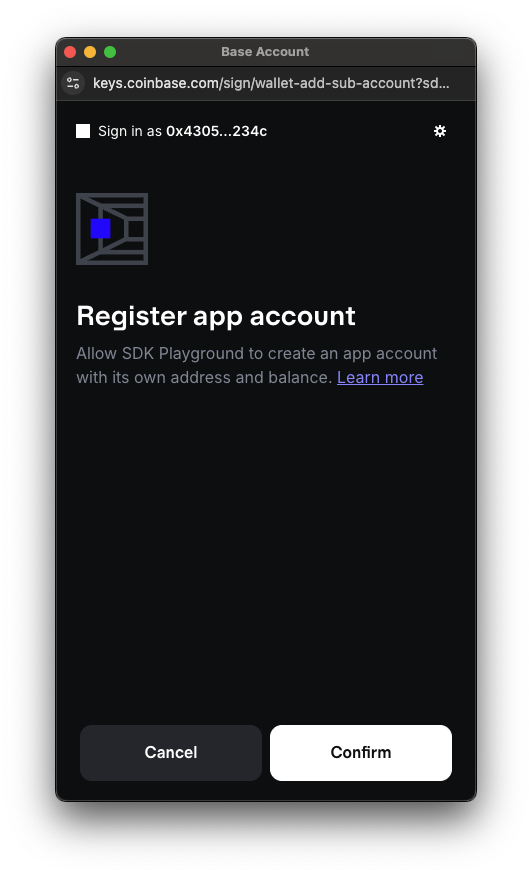
This is what the user will see when prompted to create a Sub Account:
### Get Existing Sub Account
Retrieve an existing Sub Account using the provider's [wallet\_getSubAccounts](/base-account/reference/core/provider-rpc-methods/wallet_getSubAccounts) RPC method. This will return the Sub Account associated with the app's domain and is useful to check if a Sub Account already exists for the user to determine if one needs to be created.
```tsx page.tsx theme={null}
// Get the universal account
const [universalAddress] = await provider.request({
method: "eth_requestAccounts",
params: []
})
// Get sub account for universal account
const { subAccounts: [subAccount] } = await provider.request({
method: 'wallet_getSubAccounts',
params: [{
account: universalAddress,
domain: window.location.origin,
}]
})
if (subAccount) {
console.log('Sub Account found:', subAccount.address);
} else {
console.log('No Sub Account exists for this app');
}
```
Alternatively, you can use the SDK convenience method:
```tsx page.tsx theme={null}
const subAccount = await sdk.subAccount.get();
console.log('Sub Account:', subAccount);
```
### Send transactions
To send transactions from the connected sub account you can use EIP-5792 `wallet_sendCalls` or `eth_sendTransaction`. You need to specify the `from` parameter to be the sub account address.
When the Sub Account is connected, it is the second account in the array returned by `eth_requestAccounts` or `eth_accounts`. `wallet_addSubAccount` needs to be called in each session before the Sub Account can be used. It will not trigger a new Sub Account creation if one already exists.
If you are using `mode: 'auto'`, the Sub Account will be the first account in the array.
First, get all the accounts that are available, of which the sub account will be the second account:
```tsx page.tsx theme={null}
const [universalAddress, subAccountAddress] = await provider.request({
method: "eth_requestAccounts", // or "eth_accounts" if already connected
params: []
})
```
Then, send the transaction from the sub account:
**`wallet_sendCalls`**
```tsx page.tsx theme={null}
const callsId = await provider.request({
method: 'wallet_sendCalls',
params: [{
version: "2.0",
atomicRequired: true,
from: subAccountAddress, // Specify the sub account address
calls: [{
to: '0x...',
data: '0x...',
value: '0x...',
}],
capabilities: {
// https://docs.cdp.coinbase.com/paymaster/introduction/welcome
paymasterUrl: "https://...",
},
}]
})
console.log('Calls sent:', callsId);
```
**`eth_sendTransaction`**
```tsx page.tsx theme={null}
const tx = await provider.request({
method: 'eth_sendTransaction',
params: [{
from: subAccountAddress, // Specify the sub account address
to: '0x...',
data: '0x...',
value: '0x...',
}]
})
console.log('Transaction sent:', tx);
```
We recommend using `wallet_sendCalls` in conjunction with a paymaster to ensure the best user experience. See the [Paymasters](/base-account/improve-ux/sponsor-gas/paymasters) guide for more information.
## Advanced Usage
### Import an existing account
If you already have a deployed Smart Contract Account and would like to turn it into a Sub Account of the connected Base Account, you can import it as a Sub Account using the provider RPC method:
```tsx page.tsx theme={null}
const subAccount = await provider.request({
method: 'wallet_addSubAccount',
params: [
{
account: {
type: 'deployed',
address: '0xYourSmartContractAccountAddress',
chainId: 8453 // the chain the account is deployed on
},
}
],
});
console.log('Sub Account added:', subAccount.address);
```
Before the Sub Account is imported, you will need to add the Base Account address as an owner of the Sub Account. This currently needs to be done manually
by calling the [`addOwnerAddress`](https://github.com/coinbase/smart-wallet/blob/a8c6456f3a6d5d2dea08d6336b3be13395cacd42/src/MultiOwnable.sol#L101) or [`addOwnerPublicKey`](https://github.com/coinbase/smart-wallet/blob/a8c6456f3a6d5d2dea08d6336b3be13395cacd42/src/MultiOwnable.sol#L109) functions on the Smart Contract of the Sub Account that was imported and setting the Base Account address as the owner.
Additionally, only Coinbase Smart Wallet contracts are currently supported for importing as a Sub Account into your Base Account.
The Coinbase Smart Wallet contract ABI can be found on [GitHub](https://github.com/base/account-sdk/blob/master/packages/account-sdk/src/sign/base-account/utils/constants.ts#L8).
### Add Owner Account
Sub Accounts automatically detect when an ownership update is needed when a signature is required and will prompt the user to approve the update before signing. However, you can also add an owner to a Sub Account manually using the SDK convenience method:
```tsx page.tsx theme={null}
const ownerAccount = await sdk.subAccount.addOwner({
address: subAccount?.address,
publicKey: cryptoAccount?.account?.publicKey,
chainId: base.id,
});
console.log('Owner added to Sub Account');
```
This generates a transaction to call the `addOwnerAddress` or `addOwnerPublicKey` functions on the Sub Account's smart contract to add the owner.
Ownership changes are expected if the user signs in to your app on a new device or browser.
Ensure you do not lose your app's Sub Account signer keys when using the SDK on the server (e.g. Node.js) as updating the owner requires a signature from the user, which cannot be requested from server contexts.
## Auto Spend Permissions
Auto Spend Permissions allows Sub Accounts to access funds from their parent Base Account when transaction balances are insufficient. This feature can also establish ongoing spend permissions, enabling future transactions to execute without user approval prompts, reducing friction in your app's transaction flow.
This feature is **enabled by default** when using Sub Accounts.
### How it works
**First-time transaction flow:**
When a Sub Account attempts its first transaction, Base Account displays a popup for user approval. During this approval process, Base Account:
* Automatically detects any missing tokens (native or ERC-20) needed for the transaction
* Requests a transfer of the required funds from the parent Base Account to the Sub Account to fulfill the current transaction
* Allows the user to optionally grant ongoing spend permissions for future transactions in that token
**Subsequent transactions:**
If the user granted spend permissions, future transactions follow this priority:
1. First, attempt using existing Sub Account balances and granted spend permissions
2. If insufficient, prompt the user to authorize additional transfers and/or spend permissions from their Base Account
Spend permission requests are limited to the first token when multiple transfers are needed for a single transaction. Additional tokens require separate approvals.
### Configuration
If your users' Sub Accounts will be funded manually, you can disable Auto Spend Permissions by setting `funding` to `manual` in your SDK configuration:
```tsx page.tsx theme={null}
const sdk = createBaseAccountSDK({
appName: 'Base Account SDK Demo',
appLogoUrl: 'https://base.org/logo.png',
appChainIds: [base.id],
subAccounts: {
funding: 'manual', // Disable auto spend permissions
}
});
```
## Technical Details
Base Account's self-custodial design requires a user passkey prompt for each wallet interaction, such as transactions or message signing. While this ensures user awareness and approval of every wallet interaction, it can impact user experience in applications requiring frequent wallet interactions.
To support Base Account with user experiences that need more developer control over wallet interactions, we've built Sub Accounts in conjunction with [ERC-7895](https://eip.tools/eip/7895), a new wallet RPC for creating hierarchical relationships between wallet accounts.
These Sub Accounts are linked to the end user's Base Account through an onchain relationship. When combined with our [Spend Permission feature](/base-account/improve-ux/spend-permissions), this creates a powerful foundation for provisioning and funding app accounts securely, while giving you ample control over building the user experience that makes the most sense for your application.
## Complete Integration Example
Here's a full React component that demonstrates Sub Account creation and usage:
```tsx page.tsx expandable theme={null}
import { createBaseAccountSDK } from "@base-org/account";
import { useCallback, useEffect, useState } from "react";
import { baseSepolia } from "viem/chains";
interface SubAccount {
address: `0x${string}`;
factory?: `0x${string}`;
factoryData?: `0x${string}`;
}
interface GetSubAccountsResponse {
subAccounts: SubAccount[];
}
interface WalletAddSubAccountResponse {
address: `0x${string}`;
factory?: `0x${string}`;
factoryData?: `0x${string}`;
}
export default function SubAccountDemo() {
const [provider, setProvider] = useState["getProvider"]
> | null>(null);
const [subAccount, setSubAccount] = useState(null);
const [universalAddress, setUniversalAddress] = useState("");
const [connected, setConnected] = useState(false);
const [loadingSubAccount, setLoadingSubAccount] = useState(false);
const [loadingUniversal, setLoadingUniversal] = useState(false);
const [status, setStatus] = useState("");
// Initialize SDK and crypto account
useEffect(() => {
const initializeSDK = async () => {
try {
const sdkInstance = createBaseAccountSDK({
appName: "Sub Account Demo",
appChainIds: [baseSepolia.id],
});
// Get the provider
const providerInstance = sdkInstance.getProvider();
setProvider(providerInstance);
setStatus("SDK initialized - ready to connect");
} catch (error) {
console.error("SDK initialization failed:", error);
setStatus("SDK initialization failed");
}
};
initializeSDK();
}, []);
const connectWallet = async () => {
if (!provider) {
setStatus("Provider not initialized");
return;
}
setLoadingSubAccount(true);
setStatus("Connecting wallet...");
try {
// Connect to the wallet
const accounts = (await provider.request({
method: "eth_requestAccounts",
params: [],
})) as string[];
const universalAddr = accounts[0];
setUniversalAddress(universalAddr);
setConnected(true);
// Check for existing sub account
const response = (await provider.request({
method: "wallet_getSubAccounts",
params: [
{
account: universalAddr,
domain: window.location.origin,
},
],
})) as GetSubAccountsResponse;
const existing = response.subAccounts[0];
if (existing) {
setSubAccount(existing);
setStatus("Connected! Existing Sub Account found");
} else {
setStatus("Connected! No existing Sub Account found");
}
} catch (error) {
console.error("Connection failed:", error);
setStatus("Connection failed");
} finally {
setLoadingSubAccount(false);
}
};
const createSubAccount = async () => {
if (!provider) {
setStatus("Provider not initialized");
return;
}
setLoadingSubAccount(true);
setStatus("Creating Sub Account...");
try {
const newSubAccount = (await provider.request({
method: "wallet_addSubAccount",
params: [
{
account: {
type: 'create',
},
}
],
})) as WalletAddSubAccountResponse;
setSubAccount(newSubAccount);
setStatus("Sub Account created successfully!");
} catch (error) {
console.error("Sub Account creation failed:", error);
setStatus("Sub Account creation failed");
} finally {
setLoadingSubAccount(false);
}
};
const sendCalls = useCallback(
async (
calls: Array<{ to: string; data: string; value: string }>,
from: string,
setLoadingState: (loading: boolean) => void
) => {
if (!provider) {
setStatus("Provider not available");
return;
}
setLoadingState(true);
setStatus("Sending calls...");
try {
const callsId = (await provider.request({
method: "wallet_sendCalls",
params: [
{
version: "2.0",
atomicRequired: true,
chainId: `0x${baseSepolia.id.toString(16)}`, // Convert to hex
from,
calls,
capabilities: {
// https://docs.cdp.coinbase.com/paymaster/introduction/welcome
// paymasterUrl: "your paymaster url",
},
},
],
})) as string;
setStatus(`Calls sent! Calls ID: ${callsId}`);
} catch (error) {
console.error("Send calls failed:", error);
setStatus("Send calls failed");
} finally {
setLoadingState(false);
}
},
[provider]
);
const sendCallsFromSubAccount = useCallback(async () => {
if (!subAccount) {
setStatus("Sub account not available");
return;
}
const calls = [
{
to: "0x4bbfd120d9f352a0bed7a014bd67913a2007a878",
data: "0x9846cd9e", // yoink
value: "0x0",
},
];
await sendCalls(calls, subAccount.address, setLoadingSubAccount);
}, [sendCalls, subAccount]);
const sendCallsFromUniversal = useCallback(async () => {
if (!universalAddress) {
setStatus("Universal account not available");
return;
}
const calls = [
{
to: "0x4bbfd120d9f352a0bed7a014bd67913a2007a878",
data: "0x9846cd9e", // yoink
value: "0x0",
},
];
await sendCalls(calls, universalAddress, setLoadingUniversal);
}, [sendCalls, universalAddress]);
return (