> ## Documentation Index
> Fetch the complete documentation index at: https://docs.base.org/llms.txt
> Use this file to discover all available pages before exploring further.
# Accept Payments
> Add one-tap USDC payments to your app with the pay() helper and Base Pay Button.
export const SignInWithBaseButton = ({colorScheme = 'light'}) => {
const isLight = colorScheme === 'light';
return ;
};
export const BasePayButton = ({colorScheme = 'light'}) => {
const isLight = colorScheme === 'light';
return ;
};
## Why Base Pay?
USDC on Base is a fully-backed digital dollar that settles in seconds and costs pennies in gas. Base Pay lets you accept those dollars with a single click—no cards, no FX fees, no chargebacks.
* **Any user can pay** – works with every Base Account (smart-wallet) out of the box.
* **USDC, not gas** – you charge in dollars; gas sponsorship is handled automatically.
* **Fast** – most payments confirm in \<2 seconds on Base.
* **Funded accounts** – users pay with USDC from their Base Account or Coinbase Account.
* **No extra fees** – you receive the full amount.
**Please Follow the Brand Guidelines**
If you intend on using the BasePayButton, please follow the [Brand Guidelines](/base-account/reference/ui-elements/brand-guidelines) to ensure consistency across your application.
## Client-side (Browser SDK)
**Interactive Playground:** Try out the [`pay()`](/base-account/reference/base-pay/pay) and [`getPaymentStatus()`](/base-account/reference/base-pay/getPaymentStatus) functions in our [Base Pay SDK Playground](https://base.github.io/account-sdk/pay-playground) before integrating them into your app.
```ts Browser (SDK) theme={null}
import { pay, getPaymentStatus } from '@base-org/account';
// Trigger a payment – user will see a popup from their wallet service
try {
const payment = await pay({
amount: '1.00', // USD amount (USDC used internally)
to: '0xRecipient', // your address
testnet: true // set false for Mainnet
});
// Option 1: Poll until mined
const { status } = await getPaymentStatus({
id: payment.id,
testnet: true // MUST match the testnet setting used in pay()
});
if (status === 'completed') console.log('🎉 payment settled');
} catch (error) {
console.error(`Payment failed: ${error.message}`);
}
```
**Important:** The `testnet` parameter in [`getPaymentStatus()`](/base-account/reference/base-pay/getPaymentStatus) must match the value used in the original [`pay()`](/base-account/reference/base-pay/pay) call. If you initiated a payment on testnet with `testnet: true`, you must also pass `testnet: true` when checking its status.
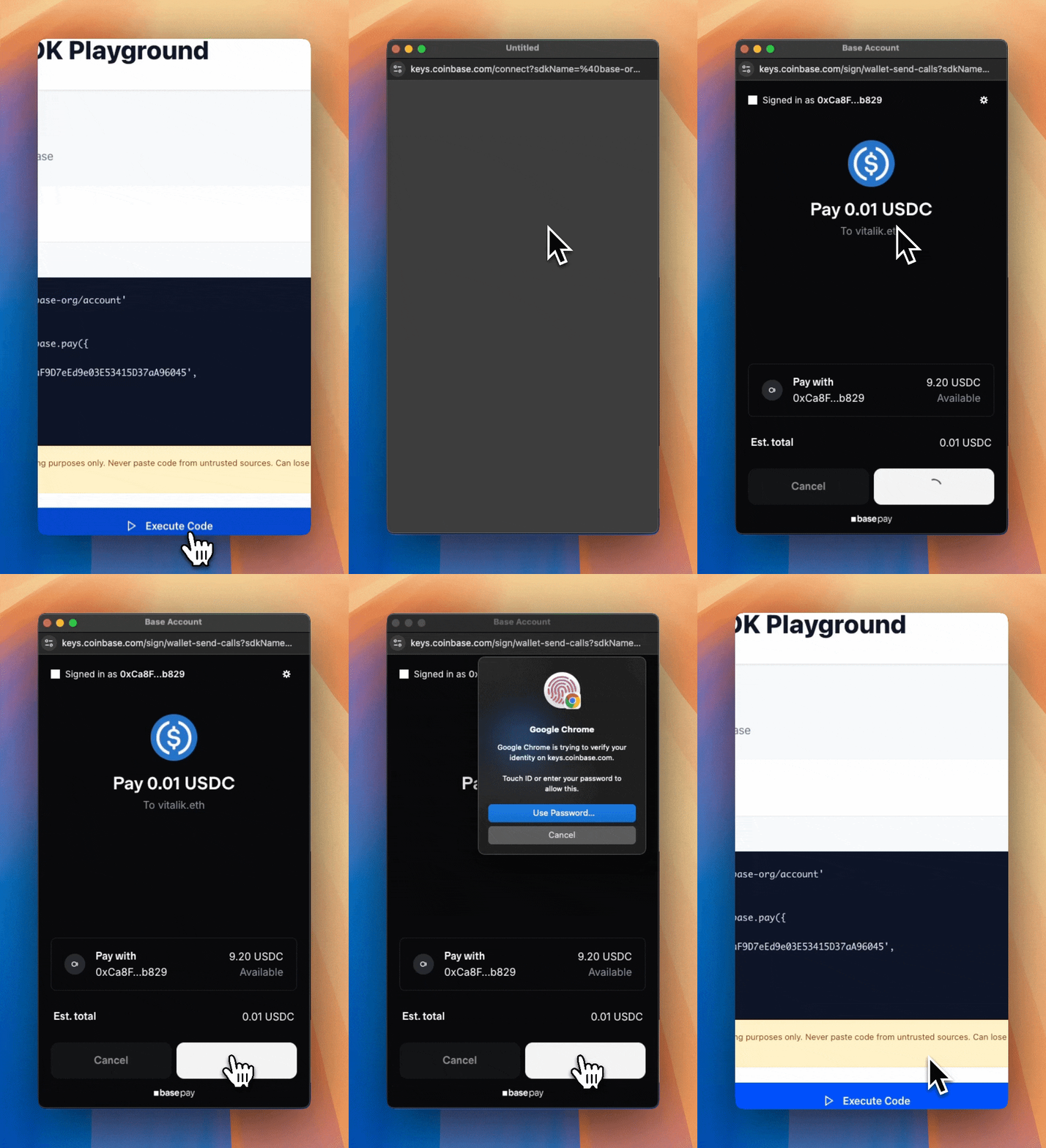
This is what the user will see when prompted to pay:
### Collect user information (optional)
Need an email, phone, or shipping address at checkout? Pass a payerInfo object:
```ts theme={null}
try {
const payment = await pay({
amount: '25.00',
to: '0xRecipient',
payerInfo: {
requests: [
{ type: 'email' },
{ type: 'phoneNumber', optional: true },
{ type: 'physicalAddress', optional: true }
],
callbackURL: 'https://your-api.com/validate' // Optional - for server-side validation
}
});
console.log(`Payment sent! Transaction ID: ${payment.id}`);
// Log the collected user information
if (payment.payerInfoResponses) {
if (payment.payerInfoResponses.email) {
console.log(`Email: ${payment.payerInfoResponses.email}`);
}
if (payment.payerInfoResponses.phoneNumber) {
console.log(`Phone: ${payment.payerInfoResponses.phoneNumber.number}`);
console.log(`Country: ${payment.payerInfoResponses.phoneNumber.country}`);
}
if (payment.payerInfoResponses.physicalAddress) {
const address = payment.payerInfoResponses.physicalAddress;
console.log(`Shipping Address: ${address.name.firstName} ${address.name.familyName}, ${address.address1}, ${address.city}, ${address.state} ${address.postalCode}`);
}
}
} catch (error) {
console.error(`Payment failed: ${error.message}`);
}
```
Supported request types:
| type | returns |
| ---------------------------- | ----------------------------------------------------------------------------------------------------- |
| email | string |
| name | \{ firstName, familyName } |
| phoneNumber | \{ number, country } |
| physicalAddress | [full address object](/base-account/reference/core/capabilities/datacallback#physical-address-object) |
| onchainAddress | string |
Required by default — set optional: true to avoid aborting the payment if the user declines.
**How to validate the user's information?**
You can use the `callbackURL` to validate the user's information on the server side.
Learn more about this in the [callbackURL reference](/base-account/reference/core/capabilities/datacallback).
## Server Side
When accepting payments, your backend must validate transactions and user info received from the frontend. This section covers two critical aspects: verifying transaction completion and validating user information.
### Verify User Transaction
Use [`getPaymentStatus()`](/base-account/reference/base-pay/getPaymentStatus) on your backend to confirm that a payment has been completed before fulfilling orders. Never trust payment confirmations from the frontend alone.
```ts Backend (SDK) theme={null}
import { getPaymentStatus } from '@base-org/account';
export async function checkPayment(txId: string, testnet = false) {
const status = await getPaymentStatus({
id: txId,
testnet // Must match the testnet setting from the original pay() call
});
if (status.status === 'completed') {
// fulfill order
}
}
```
**Prevent Replay and Impersonation Attacks**
* **Replay attacks:** A malicious user could submit the same valid transaction ID multiple times. Always track processed transaction IDs in your database.
* **Impersonation attacks:** A malicious user could submit someone else's transaction ID to fulfill their own order. Always verify that the payment sender matches the authenticated user.
Here's an example that prevents both attack vectors:
```ts Backend (with replay protection) expandable theme={null}
import { getPaymentStatus } from '@base-org/account';
// Example using a database to track processed transactions
// Replace with your actual database implementation (PostgreSQL, MongoDB, etc.)
const processedTransactions = new Map(); // In production, use a persistent database
export async function verifyAndFulfillPayment(
txId: string,
orderId: string,
payerAddress: string, // From authenticated user (SIWE, JWT, etc.)
testnet = false
) {
// 1. Check if this transaction was already processed
if (processedTransactions.has(txId)) {
throw new Error('Transaction already processed');
}
// 2. Verify the payment status on-chain
const { status, sender, amount, recipient } = await getPaymentStatus({
id: txId,
testnet
});
if (status !== 'completed') {
throw new Error(`Payment not completed. Status: ${status}`);
}
// 3. Verify the payment sender matches the authenticated user
// This prevents a malicious user from claiming someone else's payment
if (sender.toLowerCase() !== payerAddress.toLowerCase()) {
throw new Error('Payment sender does not match authenticated user');
}
// 4. Validate the payment details match your order
// This ensures the user paid the correct amount to the correct address
const expectedAmount = await getOrderAmount(orderId);
const expectedRecipient = process.env.PAYMENT_ADDRESS;
if (amount !== expectedAmount) {
throw new Error('Payment amount mismatch');
}
if (recipient.toLowerCase() !== expectedRecipient.toLowerCase()) {
throw new Error('Payment recipient mismatch');
}
// 5. Mark transaction as processed BEFORE fulfilling
// Store sender for easy lookup (e.g., to query all payments from a user)
// In production, use a database transaction to ensure atomicity
processedTransactions.set(txId, {
orderId,
sender,
amount,
timestamp: new Date()
});
// 6. Fulfill the order
await fulfillOrder(orderId);
return { success: true, orderId, sender };
}
```
**Database recommendations for tracking transactions:**
* Store the transaction ID, order ID, sender address, amount, timestamp, and fulfillment status
* Use a unique constraint on the transaction ID to prevent duplicates
* Consider adding an index on the transaction ID for fast lookups
### Validate User Info
If you're collecting user information (email, phone, shipping address) during checkout, use the `callbackURL` parameter to validate this data server-side before the transaction is submitted.
Your callback endpoint receives the user's information and must respond with either a success or error response:
```ts Backend (validation endpoint) theme={null}
export async function POST(request: Request) {
const requestData = await request.json();
const { requestedInfo } = requestData.capabilities.dataCallback;
const errors: Record = {};
// Validate email
if (requestedInfo.email) {
const blockedDomains = ['tempmail.com', 'throwaway.com'];
const domain = requestedInfo.email.split('@')[1];
if (blockedDomains.includes(domain)) {
errors.email = 'Please use a valid email address';
}
}
// Validate shipping address
if (requestedInfo.physicalAddress) {
const addr = requestedInfo.physicalAddress;
const supportedCountries = ['US', 'CA', 'GB'];
if (!supportedCountries.includes(addr.countryCode)) {
errors.physicalAddress = {
countryCode: 'We currently only ship to US, Canada, and UK'
};
}
}
// Return errors if validation failed
if (Object.keys(errors).length > 0) {
return Response.json({ errors });
}
// Success - return the request to proceed with the transaction
return Response.json({ request: requestData });
}
```
The callback is invoked **before** the transaction is submitted. If you return errors, the user is prompted to correct their information. If you return success, the transaction proceeds.
For complete details on the callback request/response format and all supported data types, see the [dataCallback reference](/base-account/reference/core/capabilities/datacallback).
## Add the Base Pay Button
Use the pre-built component for a native look-and-feel:
```tsx title="Checkout.tsx" theme={null}
import { BasePayButton } from '@base-org/account-ui/react';
import { pay } from '@base-org/account';
export function Checkout() {
const handlePayment = async () => {
try {
const payment = await pay({ amount: '5.00', to: '0xRecipient' });
console.log(`Payment sent! Transaction ID: ${payment.id}`);
} catch (error) {
console.error(`Payment failed: ${error.message}`);
}
};
return (
);
}
```
See full props and theming options in the [Button Reference](/base-account/reference/ui-elements/base-pay-button) and [Brand Guidelines](/base-account/reference/ui-elements/brand-guidelines).
**Please Follow the Brand Guidelines**
If you intend on using the BasePayButton, please follow the [Brand Guidelines](/base-account/reference/ui-elements/brand-guidelines) to ensure consistency across your application.
## Test on Base Sepolia
1. Get test USDC from the Circle Faucet (select "Base Sepolia").
2. Pass testnet: true in your pay() and getPaymentStatus() calls.
3. Use Sepolia BaseScan to watch the transaction.