> ## Documentation Index
> Fetch the complete documentation index at: https://docs.base.org/llms.txt
> Use this file to discover all available pages before exploring further.

# Setup

> Configure Wagmi with Base Account connector for your React application

export const GithubRepoCard = ({title, githubUrl}) => {
  return <a href={githubUrl} target="_blank" rel="noopener noreferrer" className="mb-4 flex items-center rounded-lg bg-zinc-900 p-4 text-white transition-all hover:bg-zinc-800">
      <div className="flex w-full items-center gap-3">
        <svg height="24" width="24" className="flex-shrink-0 dark:fill-white" viewBox="0 0 16 16" xmlns="http://www.w3.org/2000/svg">
          <path fill="currentColor" fillRule="evenodd" d="M8 0C3.58 0 0 3.58 0 8c0 3.54 2.29 6.53 5.47 7.59.4.07.55-.17.55-.38 0-.19-.01-.82-.01-1.49-2.01.37-2.53-.49-2.69-.94-.09-.23-.48-.94-.82-1.13-.28-.15-.68-.52-.01-.53.63-.01 1.08.58 1.23.82.72 1.21 1.87.87 2.33.66.07-.52.28-.87.51-1.07-1.78-.2-3.64-.89-3.64-3.95 0-.87.31-1.59.82-2.15-.08-.2-.36-1.02.08-2.12 0 0 .67-.21 2.2.82.64-.18 1.32-.27 2-.27.68 0 1.36.09 2 .27 1.53-1.04 2.2-.82 2.2-.82.44 1.1.16 1.92.08 2.12.51.56.82 1.27.82 2.15 0 3.07-1.87 3.75-3.65 3.95.29.25.54.73.54 1.48 0 1.07-.01 1.93-.01 2.2 0 .21.15.46.55.38A8.013 8.013 0 0016 8c0-4.42-3.58-8-8-8z" />
        </svg>

        <div className="flex min-w-0 flex-grow flex-col">
          <span className="truncate text-base font-medium">{title}</span>
          <span className="truncate text-xs text-zinc-400">{githubUrl}</span>
        </div>

        <svg className="h-5 w-5 flex-shrink-0 text-zinc-400" fill="none" viewBox="0 0 24 24" stroke="currentColor">
          <path strokeLinecap="round" strokeLinejoin="round" strokeWidth={2} d="M9 5l7 7-7 7" />
        </svg>
      </div>
    </a>;
};

Learn how to set up Wagmi with Base Account to enable Base Account SDK functionality with familiar React hooks.

## Overview

[Wagmi](https://wagmi.sh/) is a collection of React hooks for Ethereum Virtual Machine (EVM) compatible networks that makes it easy to work with wallets, contracts, transactions, and signing. Base Account integrates perfectly with Wagmi, allowing you to use all your familiar hooks.

You can jump ahead and use the [Base Account Wagmi Template](https://github.com/base/demos/tree/master/base-account/base-account-wagmi-template) to get started.

<GithubRepoCard title="Base Account Wagmi Template" githubUrl="https://github.com/base/demos/tree/master/base-account/base-account-wagmi-template" />

## Installation

### Option 1: New Wagmi Project

<Steps>
  <Step title="Create a new Wagmi Project">
    To create a new wagmi project, you can use the command line:

    <CodeGroup>
      ```bash npm theme={null}
      npm create wagmi@latest
      ```

      ```bash pnpm theme={null}
      pnpm create wagmi
      ```

      ```bash yarn theme={null}
      yarn create wagmi
      ```

      ```bash bun theme={null}
      bun create wagmi
      ```
    </CodeGroup>
  </Step>

  <Step title="Override the Base Account SDK version">
    To get access to the latest version of the Base Account SDK within Wagmi, you can use the following command to override it:

    <CodeGroup>
      ```bash npm theme={null}
      npm pkg set overrides.@base-org/account="latest"
      # OR manually add to package.json:
      # "overrides": { "@base-org/account": "latest" }
      ```

      ```bash pnpm theme={null}
      # pnpm requires manual addition to package.json:
      # "pnpm": { "overrides": { "@base-org/account": "latest" } }
      ```

      ```bash yarn theme={null}
      # yarn uses resolutions - add manually to package.json:
      # "resolutions": { "@base-org/account": "latest" }
      ```

      ```bash bun theme={null}
      # bun supports overrides - add manually to package.json:
      # "overrides": { "@base-org/account": "latest" }
      ```
    </CodeGroup>

    Or you can use a specific version by adding the version to the overrides:

    <CodeGroup>
      ```bash npm theme={null}
      npm pkg set overrides.@base-org/account="2.2.0"
      # OR manually add to package.json:
      # "overrides": { "@base-org/account": "2.2.0" }
      ```

      ```bash pnpm theme={null}
      # pnpm requires manual addition to package.json:
      # "pnpm": { "overrides": { "@base-org/account": "2.2.0" } }
      ```

      ```bash yarn theme={null}
      # yarn uses resolutions - add manually to package.json:
      # "resolutions": { "@base-org/account": "2.2.0" }
      ```

      ```bash bun theme={null}
      # bun supports overrides - add manually to package.json:
      # "overrides": { "@base-org/account": "2.2.0" }
      ```
    </CodeGroup>
  </Step>

  <Step title="Install the dependencies">
    Install the dependencies with your package manager of choice:

    <CodeGroup>
      ```bash npm theme={null}
      npm install
      ```

      ```bash pnpm theme={null}
      pnpm install
      ```

      ```bash yarn theme={null}
      yarn install
      ```

      ```bash bun theme={null}
      bun install
      ```
    </CodeGroup>
  </Step>
</Steps>

<Tip>
  **If this is not your first install**

  Make sure to delete your `node_modules` and `package-lock.json` and run a new install to ensure the overrides are applied.
</Tip>

### Option 2: Existing Project

<Steps>
  <Step title="Override the Base Account SDK version">
    To get access to the latest version of the Base Account SDK within Wagmi, you can use the following command to override it:

    <CodeGroup>
      ```bash npm theme={null}
      npm pkg set overrides.@base-org/account="latest"
      # OR manually add to package.json:
      # "overrides": { "@base-org/account": "latest" }
      ```

      ```bash pnpm theme={null}
      # pnpm requires manual addition to package.json:
      # "pnpm": { "overrides": { "@base-org/account": "latest" } }
      ```

      ```bash yarn theme={null}
      # yarn uses resolutions - add manually to package.json:
      # "resolutions": { "@base-org/account": "latest" }
      ```

      ```bash bun theme={null}
      # bun supports overrides - add manually to package.json:
      # "overrides": { "@base-org/account": "latest" }
      ```
    </CodeGroup>

    Or you can use a specific version by adding the version to the overrides:

    <CodeGroup>
      ```bash npm theme={null}
      npm pkg set overrides.@base-org/account="2.2.0"
      # OR manually add to package.json:
      # "overrides": { "@base-org/account": "2.2.0" }
      ```

      ```bash pnpm theme={null}
      # pnpm requires manual addition to package.json:
      # "pnpm": { "overrides": { "@base-org/account": "2.2.0" } }
      ```

      ```bash yarn theme={null}
      # yarn uses resolutions - add manually to package.json:
      # "resolutions": { "@base-org/account": "2.2.0" }
      ```

      ```bash bun theme={null}
      # bun supports overrides - add manually to package.json:
      # "overrides": { "@base-org/account": "2.2.0" }
      ```
    </CodeGroup>
  </Step>

  <Step title="Install the dependencies">
    Install the dependencies with your package manager of choice:

    <CodeGroup>
      ```bash npm theme={null}
      npm install viem wagmi @tanstack/react-query
      ```

      ```bash pnpm theme={null}
      pnpm add viem wagmi @tanstack/react-query
      ```

      ```bash yarn theme={null}
      yarn add viem wagmi @tanstack/react-query
      ```

      ```bash bun theme={null}
      bun add viem wagmi @tanstack/react-query
      ```
    </CodeGroup>
  </Step>
</Steps>

<Tip>
  **If this is not your first install**

  Make sure to delete your `node_modules` and `package-lock.json` and run a new install to ensure the overrides are applied.
</Tip>

## Configuration

### 1. Configure Wagmi with Base Account

Create your Wagmi configuration with the Base Account connector configured for Base Account:

```typescript app/wagmi.ts expandable theme={null}
import { cookieStorage, createConfig, createStorage, http } from "wagmi";
import { base, baseSepolia } from "wagmi/chains";
import { baseAccount } from "wagmi/connectors";

export function getConfig() {
  return createConfig({
    chains: [base, baseSepolia],
    multiInjectedProviderDiscovery: false,
    connectors: [
      baseAccount({
        appName: "My Wagmi App",
      }),
    ],
    storage: createStorage({
      storage: cookieStorage,
    }),
    ssr: true,
    transports: {
      [base.id]: http(),
      [baseSepolia.id]: http(),
    },
  });
}

declare module "wagmi" {
  interface Register {
    config: ReturnType<typeof getConfig>;
  }
}

```

### 2. Wrap Your App

Wrap your application with the Wagmi provider and QueryClient provider:

<CodeGroup>
  ```tsx app/providers.tsx theme={null}
  'use client'

  import { QueryClient, QueryClientProvider } from '@tanstack/react-query'
  import { type ReactNode, useState } from 'react'
  import { type State, WagmiProvider } from 'wagmi'

  import { getConfig } from '@/wagmi'

  export function Providers(props: {
    children: ReactNode
    initialState?: State
  }) {
    const [config] = useState(() => getConfig())
    const [queryClient] = useState(() => new QueryClient())

    return (
      <WagmiProvider config={config} initialState={props.initialState}>
        <QueryClientProvider client={queryClient}>
          {props.children}
        </QueryClientProvider>
      </WagmiProvider>
    )
  }

  ```

  ```tsx app/layout.tsx theme={null}
  'use client'

  import { QueryClient, QueryClientProvider } from '@tanstack/react-query'
  import { type ReactNode, useState } from 'react'
  import { type State, WagmiProvider } from 'wagmi'

  import { getConfig } from '@/wagmi'

  export function Providers(props: {
    children: ReactNode
    initialState?: State
  }) {
    const [config] = useState(() => getConfig())
    const [queryClient] = useState(() => new QueryClient())

    return (
      <WagmiProvider config={config} initialState={props.initialState}>
        <QueryClientProvider client={queryClient}>
          {props.children}
        </QueryClientProvider>
      </WagmiProvider>
    )
  }
  ```
</CodeGroup>

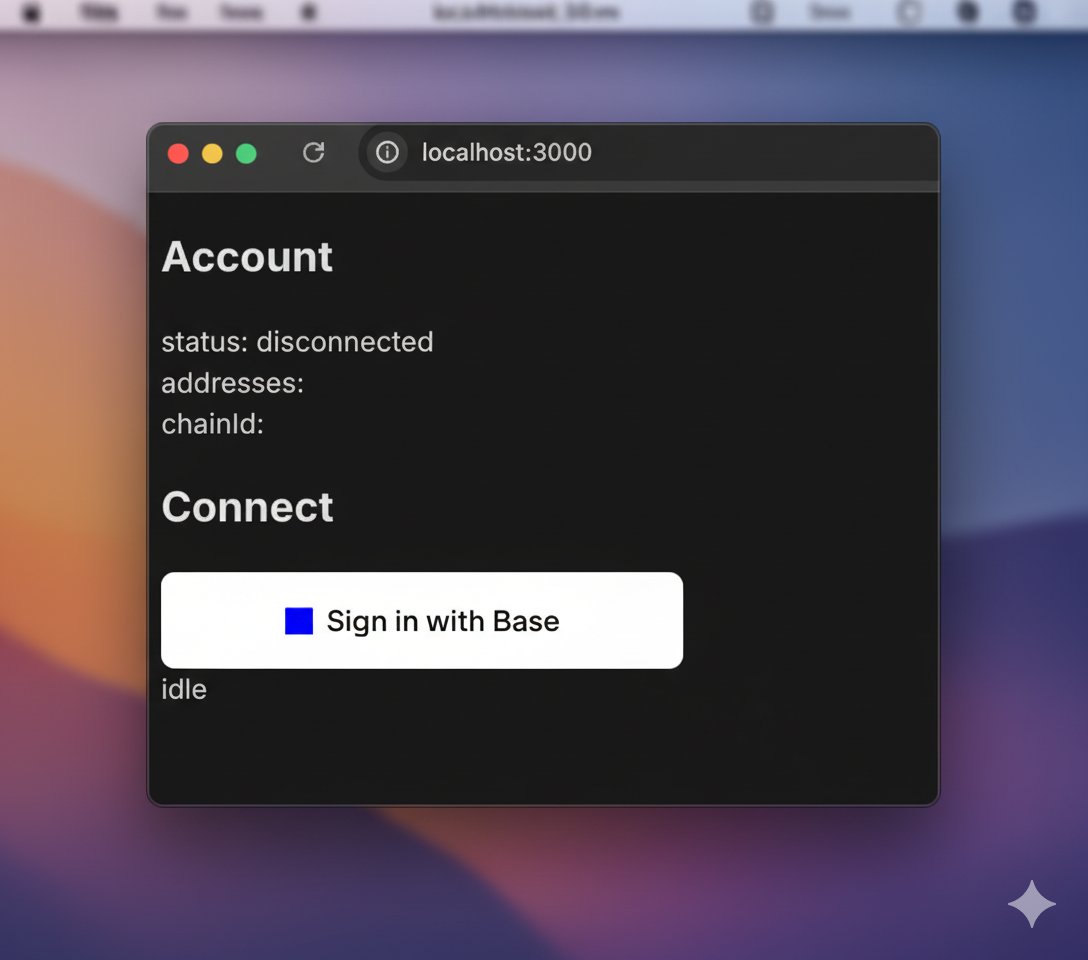
## Create a Simple Page (Sign in with Base)

Create a simple landing page that uses Sign In With Base to authenticate the user

<CodeGroup>
  ```tsx app/components/SignInWithBase.tsx expandable theme={null}
  "use client";

  import { Connector } from "wagmi";
  import { SignInWithBaseButton } from "@base-org/account-ui/react";
  import { useState } from "react";

  interface SignInWithBaseProps {
    connector: Connector;
  }

  export function SignInWithBase({ connector }: SignInWithBaseProps) {
    const [verificationResult, setVerificationResult] = useState<string>("");

    async function handleBaseAccountConnect() {
      const provider = await connector.getProvider();
      if (provider) {
        try {
          // Generate a fresh nonce (this will be overwritten with the backend nonce)
          const clientNonce =
            Math.random().toString(36).substring(2, 15) +
            Math.random().toString(36).substring(2, 15);
          console.log("clientNonce", clientNonce);
          // Connect with SIWE to get signature, message, and address
          const accounts = await (provider as any).request({
            method: "wallet_connect",
            params: [
              {
                version: "1",
                capabilities: {
                  signInWithEthereum: {
                    nonce: clientNonce,
                    chainId: "0x2105", // Base Mainnet - 8453
                  },
                },
              },
            ],
          });

          // Verify the signature on the backend
          /*
          const walletAddress = accounts.accounts[0].address;
          const signature =
            accounts.accounts[0].capabilities.signInWithEthereum.signature;
          const message =
            accounts.accounts[0].capabilities.signInWithEthereum.message;
          const verifyResponse = await fetch("/api/auth/verify", {
            method: "POST",
            headers: { "Content-Type": "application/json" },
            body: JSON.stringify({
              address: walletAddress,
              message,
              signature,
            }),
          });

          const result = await verifyResponse.json();
          */
          const result={success:true, address:accounts[0].address} // Mock response

          if (result.success) {
            setVerificationResult(`Verified! Address: ${result.address}`);
          } else {
            setVerificationResult(`Verification failed: ${result.error}`);
          }
        } catch (err) {
          console.error("Error:", err);
          setVerificationResult(
            `Error: ${err instanceof Error ? err.message : "Unknown error"}`
          );
        }
      } else {
        console.error("No provider");
      }
    }

    return (
      <div>
        <div style={{ width: "300px" }}>
          <SignInWithBaseButton
            onClick={handleBaseAccountConnect}
            variant="solid"
            colorScheme="system"
            align="center"
          />
        </div>
        {verificationResult && (
          <div style={{ marginTop: "10px" }}>{verificationResult}</div>
        )}
      </div>
    );
  }
  ```

  ```tsx app/page.tsx expandable theme={null}
  "use client";

  import { useAccount, useConnect, useDisconnect } from "wagmi";
  import { SignInWithBase } from "../components/SignInWithBase";

  function App() {
    const account = useAccount();
    const { connectors, connect, status, error } = useConnect();
    const { disconnect } = useDisconnect();

    return (
      <>
        <div>
          <h2>Account</h2>

          <div>
            status: {account.status}
            <br />
            addresses: {JSON.stringify(account.addresses)}
            <br />
            chainId: {account.chainId}
          </div>

          {account.status === "connected" && (
            <button type="button" onClick={() => disconnect()}>
              Disconnect
            </button>
          )}
        </div>

        <div>
          <h2>Connect</h2>
          {connectors.map((connector) => {
            if (connector.name === "Base Account") {
              return (
                <SignInWithBase key={connector.uid} connector={connector} />
              );
            } else {
              return (
                <button
                  key={connector.uid}
                  onClick={() => connect({ connector })}
                  type="button"
                >
                  {connector.name}
                </button>
              );
            }
          })}
          <div>{status}</div>
          <div>{error?.message}</div>
        </div>
      </>
    );
  }

  export default App;

  ```
</CodeGroup>

<Warning>
  This is a simple example to get you started.
  You will need to add your own backend logic to verify the signature and authenticate the user.

  You can find a complete example in the [Base Account Wagmi Template](https://github.com/base/demos/tree/master/base-account/base-account-wagmi-template).
</Warning>

## Run the Wagmi App

Run the application with your package manager of choice:

<CodeGroup>
  ```bash npm theme={null}
  npm run dev
  ```

  ```bash pnpm theme={null}
  pnpm run dev
  ```

  ```bash yarn theme={null}
  yarn run dev
  ```

  ```bash bun theme={null}
  bun run dev
  ```
</CodeGroup>

<div style={{ display: 'flex', justifyContent: 'center'}}>
  <img src="https://mintcdn.com/base-a060aa97/MU0RG8CHWBoEmqwh/images/base-account/wagmi-siwb.png?fit=max&auto=format&n=MU0RG8CHWBoEmqwh&q=85&s=a31aaea6f86eee91cf8de2bc4ee1902f" alt="Wagmi Setup" style={{ width: '500px', height: 'auto' }} width="1088" height="960" data-path="images/base-account/wagmi-siwb.png" />
</div>

<div style={{ textAlign: 'center', fontStyle: 'italic', marginBottom: '2rem' }}>
  What you will see when you navigate to the page
</div>

## Next Steps

Now that you have Wagmi configured with Base Account, you can:

* [Connect users with Sign in with Base](/base-account/framework-integrations/wagmi/sign-in-with-base)
* [Access the Base Account provider](/base-account/framework-integrations/wagmi/other-use-cases)