> ## Documentation Index
> Fetch the complete documentation index at: https://docs.base.org/llms.txt
> Use this file to discover all available pages before exploring further.
# Reown
> Integrate Base Account with Reown AppKit for your React application
export const GithubRepoCard = ({title, githubUrl}) => {
return
;
};
## Overview
[Reown AppKit](https://reown.com/appkit) (formerly WalletConnect) is a library for adding wallet connections to your onchain applications. It provides a polished modal interface with support for multiple wallets, email authentication, and social logins.
By integrating Reown with Base Account, you can provide users with seamless onboarding through Base's native smart wallet while maintaining access to other sign in methods.
### What you'll achieve
By the end of this guide, you will:
* Set up Reown AppKit with Base Account as a featured wallet option
* Configure the modal to prioritize Base Account in the wallet list
* Optionally add a custom Coinbase Wallet connector for legacy SDK access
You can jump ahead and use the Base Account Reown Template to get started:
## Installation
After [creating a new Next.js project](https://nextjs.org/docs/app/getting-started/installation), install the required dependencies:
```bash npm theme={null}
npm install @reown/appkit @reown/appkit-adapter-wagmi wagmi viem @tanstack/react-query
```
```bash yarn theme={null}
yarn add @reown/appkit @reown/appkit-adapter-wagmi wagmi viem @tanstack/react-query
```
```bash pnpm theme={null}
pnpm add @reown/appkit @reown/appkit-adapter-wagmi wagmi viem @tanstack/react-query
```
```bash bun theme={null}
bun add @reown/appkit @reown/appkit-adapter-wagmi wagmi viem @tanstack/react-query
```
## Get Your Reown Project ID
Before you can use Reown AppKit, you need to obtain a project ID from Reown Cloud.
1. Visit [Reown Cloud Dashboard](https://dashboard.walletconnect.com/)
2. Sign up for a free account or log in if you already have one
3. Create a new project and copy the project ID
## Configuration
### 1. Set up Environment Variables
Create a `.env.local` file in your project root:
```bash .env.local theme={null}
NEXT_PUBLIC_PROJECT_ID=your_project_id_here
```
### 2. Configure the Wagmi Adapter
Create a config file to set up the Wagmi adapter with your networks:
```typescript src/config/index.ts theme={null}
import { WagmiAdapter } from '@reown/appkit-adapter-wagmi'
import { arbitrum, base } from '@reown/appkit/networks'
import type { AppKitNetwork } from '@reown/appkit/networks'
export const projectId = process.env.NEXT_PUBLIC_PROJECT_ID!
if (!projectId) {
throw new Error('Project ID is not defined')
}
export const networks = [base, arbitrum] as [AppKitNetwork, ...AppKitNetwork[]]
export const wagmiAdapter = new WagmiAdapter({
ssr: true,
projectId,
networks
})
export const config = wagmiAdapter.wagmiConfig
```
### 3. Create the AppKit Provider
Create a context provider that initializes AppKit and wraps your application:
```tsx src/context/index.tsx expandable theme={null}
'use client'
import { wagmiAdapter, projectId, networks } from '@/config'
import { QueryClient, QueryClientProvider } from '@tanstack/react-query'
import { createAppKit } from '@reown/appkit/react'
import React, { type ReactNode } from 'react'
import { cookieToInitialState, WagmiProvider, type Config } from 'wagmi'
const queryClient = new QueryClient()
const metadata = {
name: 'My Base App',
description: 'My Base Account App',
url: 'https://myapp.com',
icons: ['https://myapp.com/icon.png']
}
// Base Account wallet ID
const BASE_ACCOUNT_WALLET_ID = 'fd20dc426fb37566d803205b19bbc1d4096b248ac04548e3cfb6b3a38bd033aa'
export const modal = createAppKit({
adapters: [wagmiAdapter],
projectId,
networks,
metadata,
themeMode: 'light',
features: {
analytics: true,
connectMethodsOrder: ['wallet', 'email', 'social'], // Wallets appear first
},
themeVariables: {
'--w3m-accent': '#0052FF', // Base blue
},
// Prioritize Base Account wallet
featuredWalletIds: [BASE_ACCOUNT_WALLET_ID],
includeWalletIds: [BASE_ACCOUNT_WALLET_ID],
allWallets: 'SHOW',
enableWallets: true,
})
function ContextProvider({ children, cookies }: { children: ReactNode; cookies: string | null }) {
const initialState = cookieToInitialState(wagmiAdapter.wagmiConfig as Config, cookies)
return (
{children}
)
}
export default ContextProvider
```
### 4. Add Provider to Layout
Update your root layout to use the context provider:
```tsx src/app/layout.tsx expandable theme={null}
import type { Metadata } from 'next'
import { headers } from 'next/headers'
import './globals.css'
import ContextProvider from '@/context'
export const metadata: Metadata = {
title: 'Base Account Reown App',
description: 'Base Account with Reown AppKit',
}
export default async function RootLayout({
children,
}: Readonly<{
children: React.ReactNode
}>) {
const headersData = await headers()
const cookies = headersData.get('cookie')
return (
{children}
)
}
```
To learn more about configuration options for Reown AppKit, please refer to the [Reown AppKit documentation](https://docs.reown.com/appkit).
## Usage
### Using the AppKit Button
Reown provides a web component for the connect button. Create a component to use it:
```tsx src/components/ConnectButton.tsx theme={null}
'use client'
export default function ConnectButton() {
return
}
```
Then use it in your page:
```tsx src/app/page.tsx theme={null}
import ConnectButton from '@/components/ConnectButton'
export default function Home() {
return (
)
}
```
### Run the project locally
```bash npm theme={null}
npm run dev
```
```bash yarn theme={null}
yarn dev
```
```bash pnpm theme={null}
pnpm dev
```
```bash bun theme={null}
bun dev
```
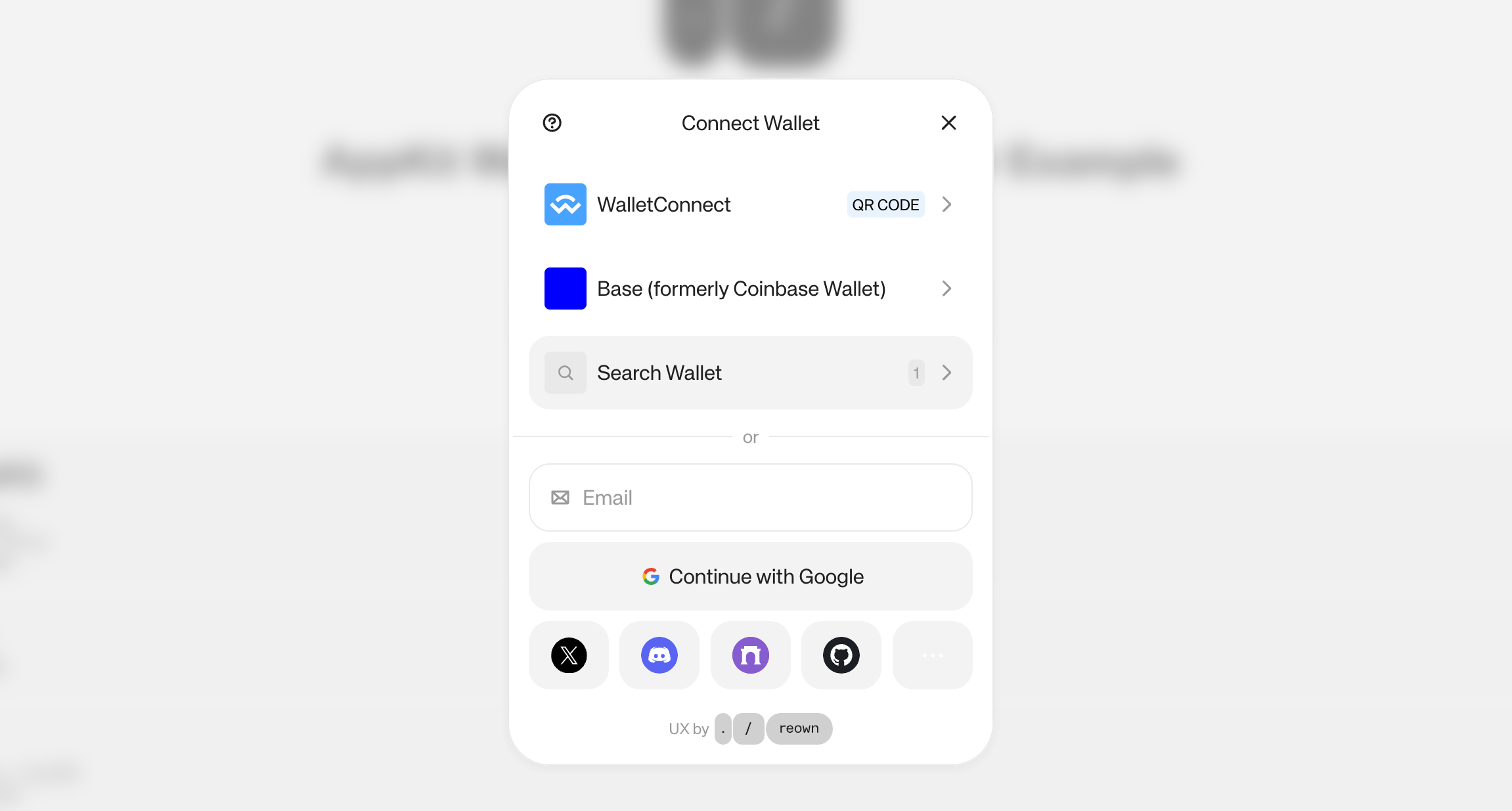
You should see a page with a connect button. Clicking it will open the Reown modal with Base Account as the featured wallet option.
## Adding Coinbase Wallet SDK Connector
If you need access to the legacy Coinbase Wallet SDK (for EOA wallet support), you can add a custom connector alongside Base Account.
Base Account uses the newer Base Account SDK. If your application specifically requires the legacy Coinbase Wallet SDK features, you can add a custom connector as shown below.
### Update the Wagmi Adapter
Modify your config to include the Coinbase Wallet connector:
```typescript src/config/index.ts expandable theme={null}
import { WagmiAdapter } from '@reown/appkit-adapter-wagmi'
import { arbitrum, base } from '@reown/appkit/networks'
import type { AppKitNetwork } from '@reown/appkit/networks'
import { coinbaseWallet } from 'wagmi/connectors'
export const projectId = process.env.NEXT_PUBLIC_PROJECT_ID!
if (!projectId) {
throw new Error('Project ID is not defined')
}
export const networks = [base, arbitrum] as [AppKitNetwork, ...AppKitNetwork[]]
// Add custom Coinbase Wallet connector for legacy SDK access
const connectors = [
coinbaseWallet({
appName: 'My Base App',
appLogoUrl: 'https://myapp.com/logo.png',
preference: 'all', // 'all' | 'smartWalletOnly' | 'eoaOnly'
}),
]
export const wagmiAdapter = new WagmiAdapter({
ssr: true,
projectId,
networks,
connectors, // Add custom connectors
})
export const config = wagmiAdapter.wagmiConfig
```
### Coinbase Wallet Preference Options
The `preference` option controls which wallet type is displayed:
| Option | Description |
| ----------------- | ---------------------------------------------------------- |
| `all` | Shows both Smart Wallet and EOA options (default) |
| `smartWalletOnly` | Only shows Coinbase Smart Wallet popup |
| `eoaOnly` | Only shows EOA Browser Extension or Mobile Coinbase Wallet |