> ## Documentation Index
> Fetch the complete documentation index at: https://docs.base.org/llms.txt
> Use this file to discover all available pages before exploring further.
# Setup
> Configure Privy with Base Account for your React application
export const GithubRepoCard = ({title, githubUrl}) => {
return
;
};
Learn how to set up Privy with Base Account to enable seamless user authentication and wallet management.
## Overview
[Privy](https://www.privy.io/) provides user authentication and wallet management solutions for onchain applications.
By integrating Privy with Base Account,
you can access all the Privy hooks and methods
while having access to the users of Base Account.
### What you'll achieve
By the end of this guide, you will:
* Set up Privy with Base Account support
* Have Base Account set up as the main authentication option
* Be able to access Base Account SDK from Privy's React SDK
You can jump ahead and use the [Base Account Privy Template](https://github.com/base/base-account-privy) to get started.
## Installation
### 1. Create a new Next.js project
```bash npm theme={null}
npx create-next-app@latest base-account-privy
cd base-account-privy
```
```bash yarn theme={null}
yarn create next-app base-account-privy
cd base-account-privy
```
### 2. Override the Base Account SDK version
In order to access the latest version of the Base Account SDK, you need to override the Privy pinned version in your package.json file.
To do this, you can use the following command to override it:
```bash npm theme={null}
npm pkg set overrides.@base-org/account="latest"
# OR manually add to package.json:
# "overrides": { "@base-org/account": "latest" }
```
```bash pnpm theme={null}
# pnpm requires manual addition to package.json:
# "pnpm": { "overrides": { "@base-org/account": "latest" } }
```
```bash yarn theme={null}
# yarn uses resolutions - add manually to package.json:
# "resolutions": { "@base-org/account": "latest" }
```
```bash bun theme={null}
# bun supports overrides - add manually to package.json:
# "overrides": { "@base-org/account": "latest" }
```
Or you can use a specific version by adding the version to the overrides:
```bash npm theme={null}
npm pkg set overrides.@base-org/account="2.2.0"
# OR manually add to package.json:
# "overrides": { "@base-org/account": "2.2.0" }
```
```bash pnpm theme={null}
# pnpm requires manual addition to package.json:
# "pnpm": { "overrides": { "@base-org/account": "2.2.0" } }
```
```bash yarn theme={null}
# yarn uses resolutions - add manually to package.json:
# "resolutions": { "@base-org/account": "2.2.0" }
```
```bash bun theme={null}
# bun supports overrides - add manually to package.json:
# "overrides": { "@base-org/account": "2.2.0" }
```
**If you're not starting a new projects**
Make sure to delete your `node_modules` and `package-lock.json` and run a new install to ensure the overrides are applied.
### 3. Install the dependencies
Install the dependencies with your package manager of choice:
```bash npm theme={null}
npm install @privy-io/react-auth @privy-io/chains @privy-io/wagmi-connector wagmi viem @base-org/account-ui react-toastify
```
```bash pnpm theme={null}
pnpm add @privy-io/react-auth @privy-io/chains @privy-io/wagmi-connector wagmi viem @base-org/account-ui react-toastify
```
```bash yarn theme={null}
yarn add @privy-io/react-auth @privy-io/chains @privy-io/wagmi-connector wagmi viem @base-org/account-ui react-toastify
```
```bash bun theme={null}
bun add @privy-io/react-auth @privy-io/chains @privy-io/wagmi-connector wagmi viem @base-org/account-ui react-toastify
```
## Configuration
### 1. Set up Environment Variables
Create a `.env.local` file in your project root:
```bash theme={null}
NEXT_PUBLIC_PRIVY_APP_ID=your_privy_app_id
```
Get your Privy App ID from the [Privy Dashboard](https://dashboard.privy.io/).
### 2. Configure Privy Provider
Create your Privy configuration with Base Account as the default login method and update the layout to include the `PrivyProvider`.
```tsx Create Provider (app/providers.tsx) expandable theme={null}
"use client";
import { PrivyProvider } from "@privy-io/react-auth";
import { base } from "@privy-io/chains";
export default function Providers({ children }: { children: React.ReactNode }) {
return (
{children}
);
}
```
```tsx Add to Layout (app/layout.tsx) expandable theme={null}
import type { Metadata } from "next";
import { Geist, Geist_Mono } from "next/font/google";
import "./globals.css";
import Providers from "./providers";
const geistSans = Geist({
variable: "--font-geist-sans",
subsets: ["latin"],
});
const geistMono = Geist_Mono({
variable: "--font-geist-mono",
subsets: ["latin"],
});
export const metadata: Metadata = {
title: "Privy Next demo",
description: "Generated by create next app",
};
export default function RootLayout({
children,
}: Readonly<{
children: React.ReactNode;
}>) {
return (
{children}
);
}
```
## Usage
### 1. Update the App Page
Update the `app/page.tsx` file to show the authentication flow:
```tsx app/page.tsx expandable theme={null}
"use client";
import { usePrivy } from "@privy-io/react-auth";
import { ToastContainer } from "react-toastify";
function Home() {
const { ready, authenticated, logout, login } = usePrivy();
if (!ready) {
return
Loading...
;
}
return (
{authenticated ? (
) : (
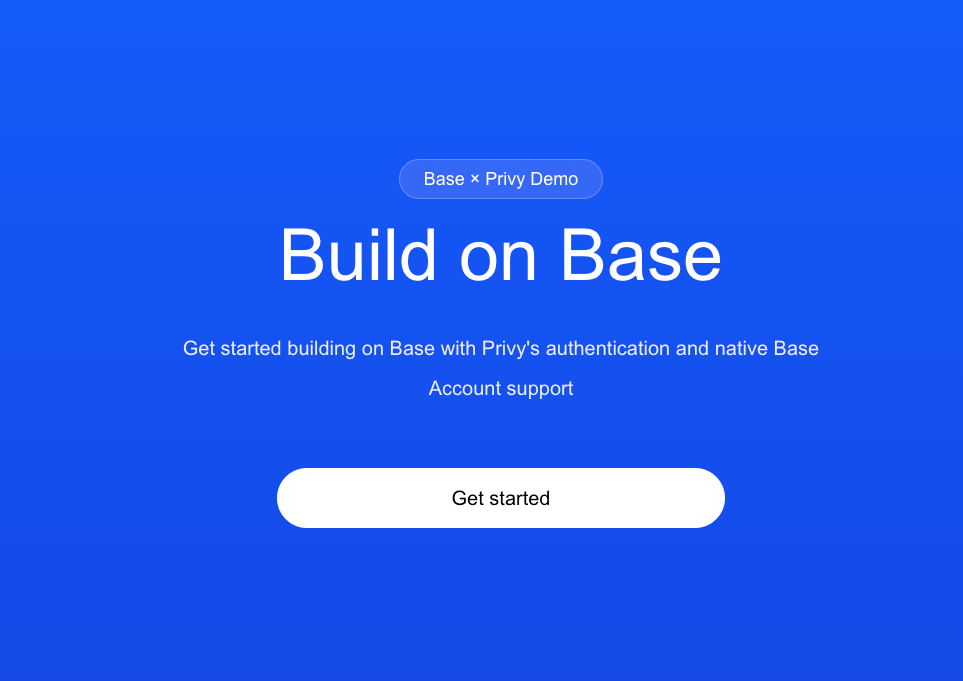
Base × Privy Demo
Build on Base
Get started building on Base with Privy's authentication and native Base Account support
)}
);
}
export default Home;
```
### 2. Run the project locally
You're done! You can now run the project locally:
```bash npm theme={null}
npm run dev
```
```bash pnpm theme={null}
pnpm dev
```
```bash yarn theme={null}
yarn dev
```
```bash bun theme={null}
bun dev
```
You should see a page that looks like this:
### 3. Get the Base Account SDK instance (Optional)
You can access the Base Account SDK from Privy using the `useBaseAccount` hook.
```tsx Get the SDK instance theme={null}
import { useBaseAccountSdk } from '@privy-io/react-auth';
const { baseAccountSdk } = useBaseAccountSdk();
const provider = baseAccountSdk.getProvider();
const addresses = await provider.request({method: 'wallet_connect'});
```